Tuesday, August 26, 2008
|
A forgotten gem.

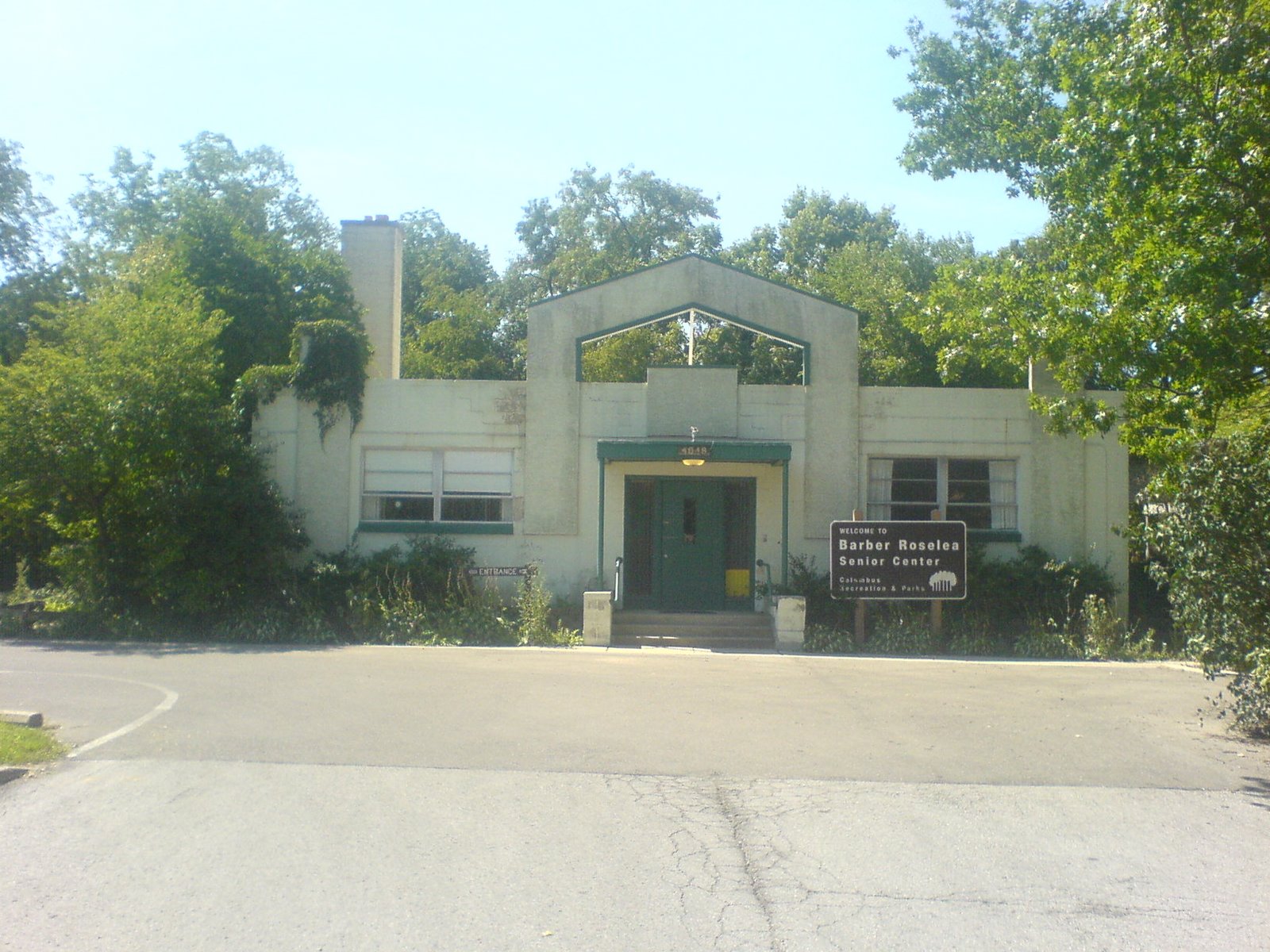
The Barber Roselea Senior Center is part of the Columbus Department of Recreation and Parks. The building has always intrigued me as I'd catch glimpses of it from Croswell Rd. I finally decided to walk down and take a look. It's a very interesting building. I'd say it's a mix of 1930s and 1950s.
* A MILESTONE - MY 100th POST *
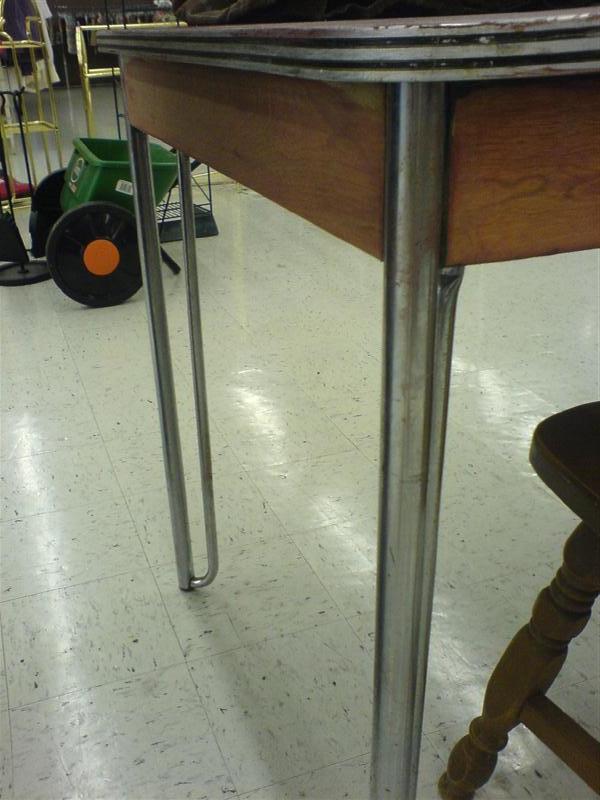
This is an interesting desk at a neighborhood thrift shop. The extra legs provide stability, an additional visual element and don't affect the leveling of the table because they don't contact the floor.

This is an interesting desk at a neighborhood thrift shop. The extra legs provide stability, an additional visual element and don't affect the leveling of the table because they don't contact the floor.
Friday, August 22, 2008
|
This is another non-furniture related post. This weekend marks the fifth anniversary of my graduation from Ohio University's MBA program. August 20th and 22nd have never been the same since. Congratulations to me and to every OU MBA past and present.
Tuesday, August 19, 2008
|
The problem with upgrading legacy hardware is that the new paint doesn't help the doors stay on.
The backlight went out on the Toshiba Satellite 1130-S155 that I've been working on. Looks like this'll be a VGA or S-Video out machine from now on.
Tuesday, July 29, 2008
|
After a furniture post, I have to follow up with one that isn't. This is about a Toshiba Satellite 1135-S155 notebook computer.
After picking up a Gigabyte Mini PCI GN-WI01GS (IIIB form factor) 802.11G wireless card, it worked great in my Sony PCG-SRX99, however the Toshiba I recently fell into didn't work. The physical switch is on, the adapter is recognized by windows, installed the Gigabyte driver and app, but it says the radio is off. Hmm... time to search the web.
Googling: toshiba wireless 1135-s155 802.11g
Returned this link on page #1: http://www.motherboardpoint.com/archive/f37-laptops.html
Which I've provided below. It worked! The chassis LED isn't lit for the card, but that's fine. I'm up and running. Who'd have thought covering pins 11 & 13 would fix it?
Re: SOLVED: How to enable Broadcom 802.11g on Toshiba Satellite?
--------------------------------------------------------------------------------
Oscar T Grouch <> writes:
> On Sun, 29 Jun 2003 04:43:52 GMT, ender (Jeffrey J.
> Kosowsky) wrote:
> :>I have installed a Broadcom 802.11g mini-pci wireless card in my
> :>Toshiba Satellite 1135-S125.
> :>
> :>- Anyone successful in getting their card to work??
>
> I'd be interested in hearing if they have for future reference.
Just got mine to work based on suggestion passed on from "alkaprim"
who was trying to do a similar thing in a recent previous thread. He
writes:
> I've got it from someone else
> Quote"
> Toshiba fix:
> "Basically you have to cover pins 11 and 13. All the pins on the reverse of
> the card are even numbers, all the pins on the top of the card are odd
> numbers. I just covered 11 & 13 with electrical tape. you don't want the
> tape on both side because each pin is separate. Though the tape does have to
> go over the lip in order for it to stay on when you insert the card because
> it likes to slide Holding the card with the connector at the bottom, you
> count left to right. 11 and 13 are right next to each other. This is what
> happens when manufacturer's stray from the mini-pci standard".
>
> End quote"
I verified it using the electrical tape trick, but for more
reliability and elegance, I placed a "bubble" of clear nail polish
over the two conductors (one of my favorite tricks with nail
polish...). This bubble can later either be scraped off or removed
with nail polish remover as needed.
A more permanent solution would use a razor blade to slit the two very
thin traces that arise from these two pins.
The only question that remains for me is what is the real purpose of
pins 11 & 13 and what has Toshiba/Compal done differently with them
than other manufacturers?
Presumably these pins are used to turn on & off the radio which might
explain why neither the physical switch on the side of the laptop nor
the fn-f8 trick work to turn on-and-off the laptop.
If we knew what these pins did and how Toshiba uses them, we might be
able to recover this functionality with some creative jumpering rather
than just "covering over" pins 11 & 13.
Barring such a solution, what is the best way to turn on & off the
radio so as to reduce drain on the battery when wireless is not in
use?
Possibilities include:
- Disabling the driver in the Device Manager
- Disabling the radio (and/or turning down the power) under the
advanced tab of the Linksys/Broadcom driver
- Removing the card [included for completeness ]
Any further insight or suggestions?
After picking up a Gigabyte Mini PCI GN-WI01GS (IIIB form factor) 802.11G wireless card, it worked great in my Sony PCG-SRX99, however the Toshiba I recently fell into didn't work. The physical switch is on, the adapter is recognized by windows, installed the Gigabyte driver and app, but it says the radio is off. Hmm... time to search the web.
Googling: toshiba wireless 1135-s155 802.11g
Returned this link on page #1: http://www.motherboardpoint.com/archive/f37-laptops.html
Which I've provided below. It worked! The chassis LED isn't lit for the card, but that's fine. I'm up and running. Who'd have thought covering pins 11 & 13 would fix it?
Re: SOLVED: How to enable Broadcom 802.11g on Toshiba Satellite?
--------------------------------------------------------------------------------
Oscar T Grouch <> writes:
> On Sun, 29 Jun 2003 04:43:52 GMT, ender (Jeffrey J.
> Kosowsky) wrote:
> :>I have installed a Broadcom 802.11g mini-pci wireless card in my
> :>Toshiba Satellite 1135-S125.
> :>
> :>- Anyone successful in getting their card to work??
>
> I'd be interested in hearing if they have for future reference.
Just got mine to work based on suggestion passed on from "alkaprim"
who was trying to do a similar thing in a recent previous thread. He
writes:
> I've got it from someone else
> Quote"
> Toshiba fix:
> "Basically you have to cover pins 11 and 13. All the pins on the reverse of
> the card are even numbers, all the pins on the top of the card are odd
> numbers. I just covered 11 & 13 with electrical tape. you don't want the
> tape on both side because each pin is separate. Though the tape does have to
> go over the lip in order for it to stay on when you insert the card because
> it likes to slide Holding the card with the connector at the bottom, you
> count left to right. 11 and 13 are right next to each other. This is what
> happens when manufacturer's stray from the mini-pci standard".
>
> End quote"
I verified it using the electrical tape trick, but for more
reliability and elegance, I placed a "bubble" of clear nail polish
over the two conductors (one of my favorite tricks with nail
polish...). This bubble can later either be scraped off or removed
with nail polish remover as needed.
A more permanent solution would use a razor blade to slit the two very
thin traces that arise from these two pins.
The only question that remains for me is what is the real purpose of
pins 11 & 13 and what has Toshiba/Compal done differently with them
than other manufacturers?
Presumably these pins are used to turn on & off the radio which might
explain why neither the physical switch on the side of the laptop nor
the fn-f8 trick work to turn on-and-off the laptop.
If we knew what these pins did and how Toshiba uses them, we might be
able to recover this functionality with some creative jumpering rather
than just "covering over" pins 11 & 13.
Barring such a solution, what is the best way to turn on & off the
radio so as to reduce drain on the battery when wireless is not in
use?
Possibilities include:
- Disabling the driver in the Device Manager
- Disabling the radio (and/or turning down the power) under the
advanced tab of the Linksys/Broadcom driver
- Removing the card [included for completeness ]
Any further insight or suggestions?
Saturday, June 28, 2008
|
Some very slick furniture from the archetecture firm Skidmore, Owings and Merrill. It's called Halcon Medio Furniture. These are the architecs that brought us the Burj Dubai, the Sears Tower, the John Hancock Center.


Another building of note is the Orlando Public Library as designed by John M. Johansen.